How Payment Flow Works Callbacks, Webhooks
Topics for Discussed:
- Implementing a Payment Service:
- What are Callback URLs and why are they important?
- Understanding Webhooks: How do they work in payment processing?
- The Reconciliation Process: Ensuring transaction accuracy over time.
How Payment Process Works?
Why is Handling Payments Complex?
Payments may seem simple to users, but for developers and businesses, managing them involves significant complexity. Some reasons for this complexity include:
-
Security and Privacy Concerns: Payment systems handle sensitive data like credit card information, which requires robust encryption and strict compliance with regulations to prevent fraud and data breaches.
-
Diversity of Payment Methods:
- A typical payment system must be able to interact with a wide array of payment methods—ranging from credit and debit cards to digital wallets (like Google Pay, PayPal, etc.) and direct bank transfers.
- This means the payment system needs to communicate with multiple banks, wallet providers, and financial institutions, often in different countries with different regulations.
-
Regulatory Requirements:
- Many countries have strict laws governing financial transactions. For instance, businesses that process credit card payments must comply with the PCI-DSS (Payment Card Industry Data Security Standard).
- Certification for these requirements adds additional layers of responsibility and complexity.
Build vs. Buy Debate
Given these complexities, many businesses face the decision of whether to Build their own payment infrastructure or Buy one from third-party providers:
-
Build: Large companies like Google or Amazon may opt to build their own payment system in-house, allowing them full control over customization, security, and processes.
-
Buy: Most companies, however, prefer to integrate with a third-party payment provider (Payment Gateway), saving time and resources. Examples of third-party payment gateways include:
- India: Razorpay, PayU Money, Billdesk, CCavenue, PhonePe, and PayTM.
- Global: Stripe, PayPal.
-
Costs: Payment gateways typically charge around 2% of the transaction value as a service fee for processing payments.
How to Typically Interact with a Payment Gateway?
Journey of a Payment on Amazon
To understand how businesses like Amazon handle payments, let’s walk through a typical payment journey:
-
Scenario: Imagine you are shopping on Amazon. You’ve added an item to your cart and are ready to check out.
-
First Question: What do you think happens first—do you create an order or make the payment?
- Let’s consider what could go wrong if you paid first. What if the payment was deducted but the system failed to create the order? Or, what if the order was created, but the payment status was unclear due to technical issues like a failed internet connection?
-
Answer: The industry-standard practice is to first create the order, then take the payment. This allows the company to track the payment against a specific order.
-
Why Create the Order First?
-
Tracking Payments: By creating an order before payment, the system can link the payment to a specific order even if the payment succeeds or fails later.
-
Preventing Double Charges: If the user clicks the "Pay" button multiple times (e.g., due to network issues), the system uses the Order ID to check whether the payment has already been processed, avoiding duplicate charges.
-
Idempotency Key:
- The Order ID serves as an idempotency key, ensuring that the same order is not processed multiple times. This is crucial when handling duplicate requests caused by retries (e.g., when the user’s internet connection drops temporarily).
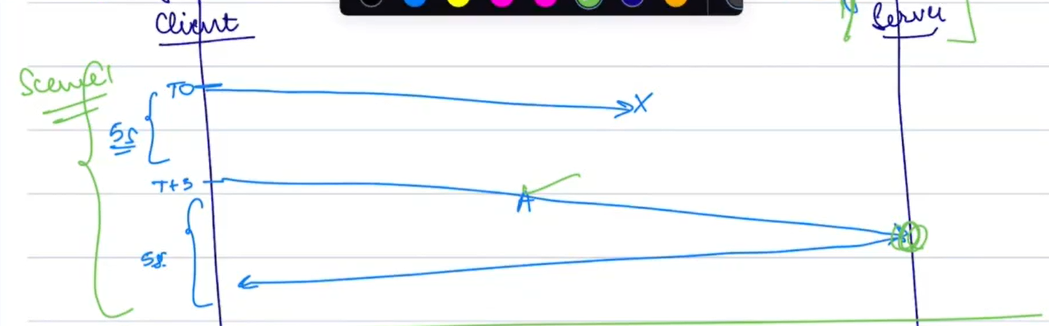
- Consider the following illustration:
- The first request to the payment gateway might fail due to a timeout, but the retry sends the same Order ID. The server identifies that the request is a duplicate and prevents charging the user twice.
Payment Flow Overview
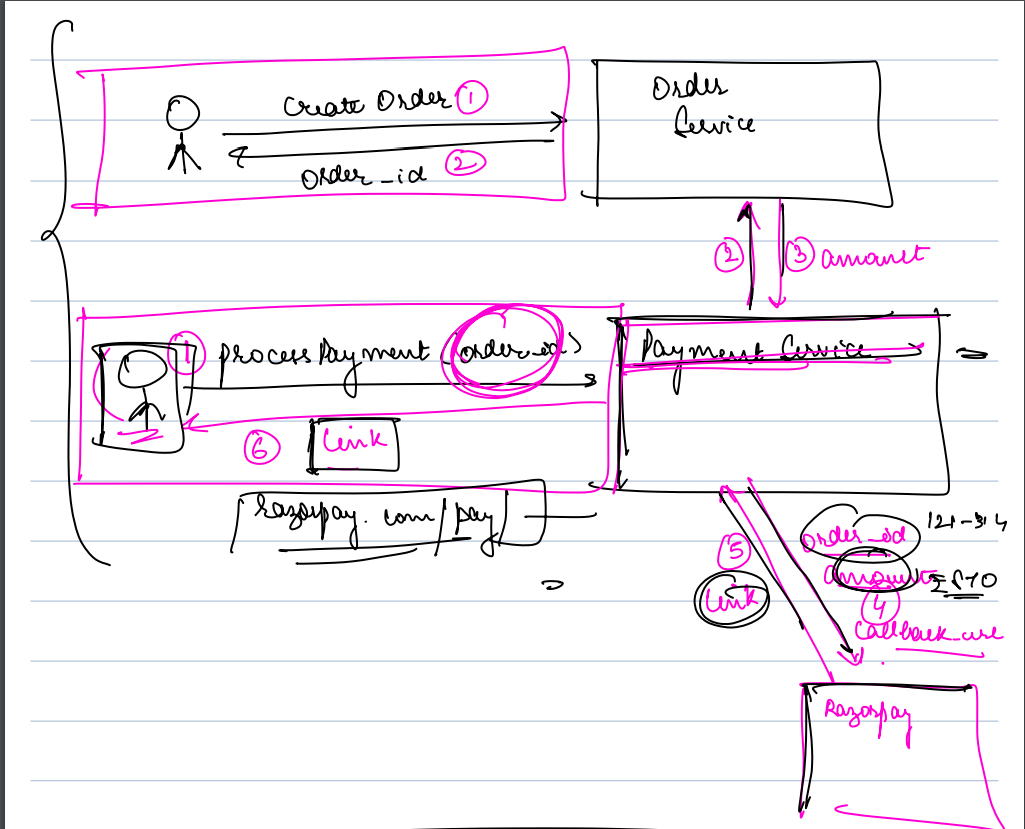
Let’s break down the flow from the moment the user confirms their order to completing the payment:
-
Client Interaction: The user selects items to purchase and proceeds to checkout.
-
Order Creation: The frontend sends a request to the backend (
orderService) to create the order with details such as:{ "items": [...], "user_id": "...", "timestamp": "..." }- The Order Service returns an
order_idthat uniquely identifies the purchase.
- The Order Service returns an
-
Backend Security Measures:
- The backend contacts the Payment Service with the
order_idand amount to securely request payment from the payment gateway (e.g., Razorpay). - Why not send from the frontend?: Sending the payment request directly from the frontend is risky because malicious users could manipulate the amount (e.g., setting it to 0). Keeping this process server-side ensures that all sensitive details are protected.
- The backend contacts the Payment Service with the
-
Payment Link Generation:
- The payment gateway (e.g., Razorpay) generates a payment link for the user to complete the transaction.
- The user is redirected to the payment gateway’s secure page to enter their payment details.
-
Security Advantage:
- As a developer, you don’t handle sensitive payment information directly. All payment details are processed by the third-party gateway (Razorpay, Stripe, etc.).
Callback URL
- Once the payment is completed (success or failure), the payment gateway needs to inform your system.
-
Callback URL:
- At the time of initiating the payment, your system provides the payment gateway with a Callback URL.
- This URL is called by the payment gateway to notify your system when the payment status changes.
-
Why is the Callback URL Important?
- It allows your system to:
- Send order confirmation emails.
- Generate invoices.
- Update the database with payment status.
- It allows your system to:
-
Backend Process:
- When the payment gateway redirects the user to the callback URL, the system verifies the payment status by querying the payment service (e.g.,
paymentServiceusing theorder_id).
- When the payment gateway redirects the user to the callback URL, the system verifies the payment status by querying the payment service (e.g.,
Points of Failure
There are several potential points of failure between the payment gateway and the callback URL:
- User closes the browser tab during payment.
- The back button is pressed before the payment is confirmed.
- Internet connection drops during the payment process.
Solution: While callback URLs are useful, they are not entirely foolproof. This is where Webhooks come in to ensure a more reliable notification system.
Webhooks
What Are Webhooks?
-
Unlike callback URLs, which are tied to user redirection, Webhooks are server-side APIs that are triggered by the payment gateway when certain events occur.
-
How Webhooks Work:
- You configure webhooks in your payment gateway settings (e.g., Razorpay, Stripe) to listen for specific events like "payment success" or "payment failure."
- When the event occurs, the gateway sends a request to the webhook endpoint on your server with the event details.
-
Webhook Configuration: In the Razorpay settings, you can specify which events should trigger the webhook and which URL to send the notification to.
Handling Service Downtime
-
What if your Order Service is down?
- If both the Callback URL and the Webhook fail because your server is unavailable, your system won’t know if the payment was successful or failed.
-
Solution: In such cases, businesses use a process known as Reconciliation to cross-check and ensure all payments are accounted for.
Reconciliation Process
What is Reconciliation?
Reconciliation is the process of comparing internal records (stored in your Order Service) with the transaction records provided by the payment gateway.
- How it Works:
- Every few hours, the payment gateway sends a file containing a list of all successful and failed transactions for that period.
- Your Order Service processes this file and checks it against your internal records to identify any discrepancies.
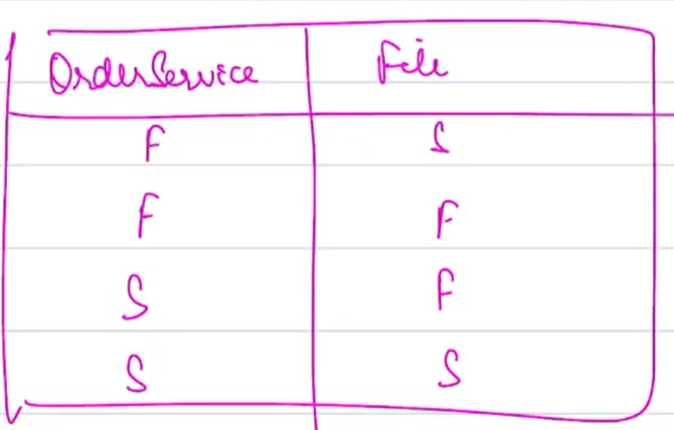
Four Possible Scenarios During Reconciliation:
-
Order failed, but payment succeeded:
- Example: Your system shows the order as failed, but the payment gateway shows it succeeded. In such cases, you might choose to either:
- Issue a refund, or
- Mark the order as successful (e.g., for essential services like utility bills).
- Example: Your system shows the order as failed, but the payment gateway shows it succeeded. In such cases, you might choose to either:
-
Both order and payment failed:
- No action is needed. Both systems agree that the transaction failed.
-
Order succeeded, but payment failed:
- This scenario might occur if the user started the payment process but did not complete it (e.g., due to a credit card block).
- You may either refund the amount (if charged) or cancel the order.
-
Both order and payment succeeded:
- No action is needed as the transaction is complete and accurate.
Conclusion
By combining Callback URLs, Webhooks, and Reconciliation, you can build a comprehensive and resilient payment system capable of handling
various points of failure and ensuring accurate transaction tracking.