Lists in React
Let us suppose we have a list of products,
productArray = [laptop, headphones, mouse]
- Let us create a component named
Products, so we will create a file namedProducts.jsinside the components folder. - Now open
Products.js, then typerfceand press enter.
import React from 'react'
function Products(){
    return{
        <div>Products</div>
    }
}
export default Products
- Let us assume we have a
productsarray, which contains products.
import React from 'react'
function Products(){
    let products = ['Laptop', 'Headphones', 'Keyboard', 'Mouse']
    return{
        <div>Products</div>
    }
}
export default Products
- Now we want to show all the elements of the
productsarray in the HTML. - The first way is to simply iterate and display every element.
import React from 'react'
function Products(){
    let products = ['Laptop', 'Headphones', 'Keyboard', 'Mouse']
    return{
        <div>
            for(let i = 0;i < products.length; i++){

            }
        </div>
    }
}
export default Products
Here syntax is correct, but it will give an error, as JSX does not allow us to write a loop in this way. In place of loops, we can higher-order functions.
- We will use
mapwith an array, by which we get access to all the array elements one by one. We will create a list element of every element one by one.
import React from 'react'
function Products(){
    let products = ['Laptop', 'Headphones', 'Keyboard', 'Mouse']
    return{
        <div>
            {products.map((product) => {
               return <li>{product}</li>
            })}
        </div>
    }
}
export default Products
- Now we need to import the
Productscomponent inApp.
import Products from './components/Products';
function App(){
    return {
        <div>
            <Products/>
        </div>
    };
}
export default App
When we run this, and we will see the output we will get the correct output, but a warning is also there in the console.
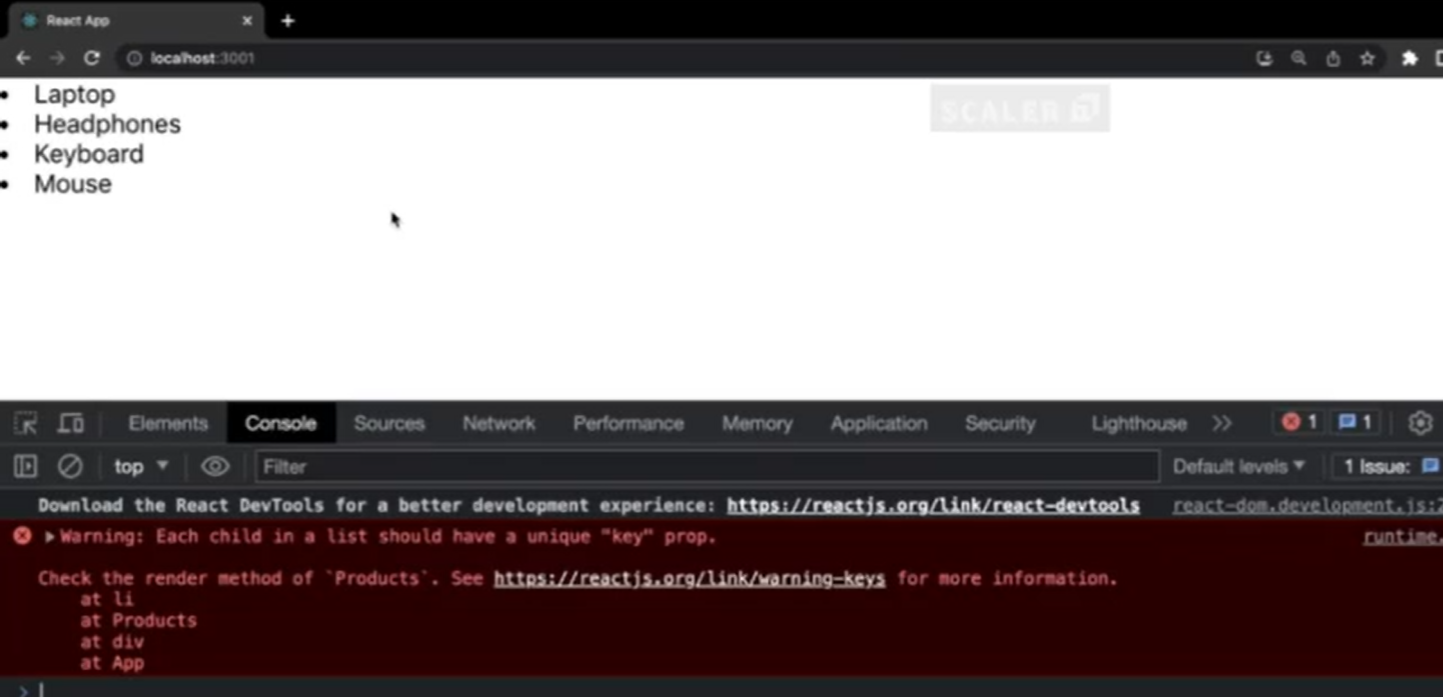
This warning says that every child in a list should have a unique 'key' prop.
- React says whenever you create a list element, you should provide a unique key to it so that when React updates the DOM, it can uniquely identify what is required to be updated. The key is a unique ID.
So we will create a key for every list element, and we are creating the key with the product name, as every product has a different name.
import React from 'react'
function Products(){
    let products = ['Laptop', 'Headphones', 'Keyboard', 'Mouse']
    return{
        <div>
            {products.map((product) => {
               return <li key = {product}>{product}</li>
            })}
        </div>
    }
}
export default Products
- But in case, we have two products with the same name,
let products = ['Laptop', 'Headphones', 'Keyboard', 'Mouse', 'Laptop']
import React from 'react'
function Products(){
    let products = ['Laptop', 'Headphones', 'Keyboard', 'Mouse', 'Laptop']
    return{
        <div>
            {products.map((product) => {
               return <li key = {product}>{product}</li>
            })}
        </div>
    }
}
export default Products
- Now the problem will occur, as the two products have the same name, so the key will not remain unique as the same laptop key is assigned to two products.
- Now we will again get a warning
encountered two children with a same key laptop. - So we can use index,
map()will also have access to all the indexes. And every array element has a unique index, starting from 0, 1, 2, 3, ..... - So we can make the key using the index.
import React from 'react'
function Products(){
    let products = ['Laptop', 'Headphones', 'Keyboard', 'Mouse', 'Laptop']
    return{
        <div>
            {products.map((product, index) => {
               return <li key = {index}>{product}</li>
            })}
        </div>
    }
}
export default Products
Using objects
- We will create an array of objects for products.
import React from 'react'
function Products(){
    let productsList = [
        { id: 1, name: "Laptop", price: 35000},
        { id: 2, name: "Headphones", price: 12000},
        { id: 3, name: "Mouse", price: 8000},
        { id: 4, name: "Keyboard", price: 10000},
    ]
    return{
        <div>

        </div>
    }
}
export default Products
- Now we will display this product list in HTML using
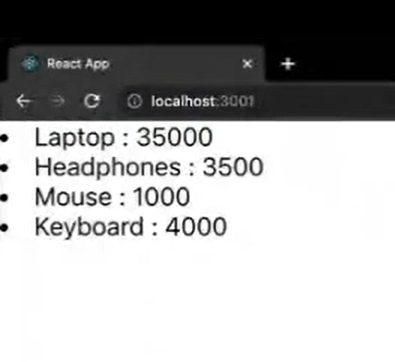
map. Now we are using theidof every object of an array for creating the key and then we are displaying the name and price of that particular product.
import React from 'react'
function Products(){
    let productsList = [
        { id: 1, name: "Laptop", price: 35000},
        { id: 2, name: "Headphones", price: 12000},
        { id: 3, name: "Mouse", price: 8000},
        { id: 4, name: "Keyboard", price: 10000},
    ]
    return{
        <div>
            {
        productsList.map((product) => {
            return <li key = {product.id}>{product.name} : {product.price}</li>
        })
    }
        </div>
    }
}
export default Products
Output:
- We can also remove the return keyword written before
<li>, but then we need to enclose the list element creation code in(), instead of{}.
import React from 'react'
function Products(){
    let productsList = [
        { id: 1, name: "Laptop", price: 35000},
        { id: 2, name: "Headphones", price: 12000},
        { id: 3, name: "Mouse", price: 8000},
        { id: 4, name: "Keyboard", price: 10000},
    ]
    return{
        <div>
            {
        productsList.map((product) => (
           <li key = {product.id}>{product.name} : {product.price}</li>
        ))
    }
        </div>
    }
}
export default Products
Form Handling in React
- Form is a layout which will accept data from the user.
- Form has text boxes, labels, checkboxes, buttons, etc. by which the user can provide some input.
- Then the user will click on submit, then all the data will go to the database, or be sent for some processing.
In react, we can also work with forms.
- Let us create a component named
Form, so first we will create a file namedForm.jsinside the components folder. - Now open
Form.js, then typerfceand press enter.
import React from 'react'
function Form(){
    return{
        <div>Form</div>
    }
}
export default Form
- Let us create a form by the
<form>tag, and inside that form, we will create one label and input field.
import React from 'react'
function Form(){
    return{
        <div>
            <h1>This is a form</h1>
            <form>
                <label>firstName</label>
                <input type = "text" value = "firstName" ></input>
            </form>
        </div>
    }
}
export default Form
- Now we need to import the
Formcomponent inApp.
import Form from './components/Form';
function App(){
    return {
        <div>
            <Form/>
        </div>
    };
}
export default App
- But now if we try to change the data of the input field we are not able to change it, but in HTML if we create an input field we can change the data of it.
- This is because props are immutable. And
valueof theinputfield is behaving like props, and that's why we are not able to update it. - And if we want to change the value of prop, then we need to use state.
-
But in the functional components we don't use state, so in place of it we will use the useState hook.
-
Firstly we need to import the
useStatehook.
import React from 'react'
import {useState} from 'react'
function Form(){
    return{
        <div>
            <h1>This is a form</h1>
            <form>
                <label>firstName</label>
                <input type = "text" value = "firstName" ></input>
            </form>
        </div>
    }
}
export default Form
- Now we will use the
useState()hook.
import React from 'react'
import {useState} from 'react'
function Form(){
    const [firstName, setFirstName] = useState('')
    return{
        <div>
            <h1>This is a form</h1>
            <form>
                <label>firstName</label>
                <input type = "text" value = {firstName} ></input>
            </form>
        </div>
    }
}
export default Form
- We have initialized
firstNamewith an empty string, but for updating the value offirstNamewe will create a functionhandleChange. Whenever there is a change in the value of the input field this function will be called so we will call this function on theonChangeevent of the input field and this function will receive an event ase.
import React from 'react'
import {useState} from 'react'
function Form(){
    const [firstName, setFirstName] = useState('')
    let handleChange = (e) => {

    }
    return{
        <div>
            <h1>This is a form</h1>
            <form>
                <label>firstName</label>
                <input type = "text" onChange = {handleChange} value = {firstName} ></input>
            </form>
        </div>
    }
}
export default Form
- Inside this function we will call the
setFirstNamewith the new typed value so that thefirstNamewill be updated to a new typed value.
import React from 'react'
import {useState} from 'react'
function Form(){
    const [firstName, setFirstName] = useState('')
    let handleChange = (e) => {
        setFirstName(e.target.value)
    }
    return{
        <div>
            <h1>This is a form</h1>
            <form>
                <label>firstName</label>
                <input type = "text" onChange = {handleChange} value = {firstName} ></input>
            </form>
        </div>
    }
}
export default Form
Submitting form data
- Creating a submit button.
import React from 'react'
import {useState} from 'react'
function Form(){
    const [firstName, setFirstName] = useState('')
    let handleChange = (e) => {
        setFirstName(e.target.value)
    }
    return{
        <div>
            <h1>This is a form</h1>
            <form>
                <label>firstName</label>
                <input type = "text" onChange = {handleChange} value = {firstName} ></input>
                <button>Submit Form Button</button>
            </form>
        </div>
    }
}
export default Form
- We will create a function
handleSubmitand call it on theonSubmitevent of the form. AndhandleSubmitwill also receive the event as a parameter. Inside that function, we will usee.preventDefault()to avoid automatic refreshing of the page and we will printfirstNameinside this function.
import React from 'react'
import {useState} from 'react'
function Form(){
    const [firstName, setFirstName] = useState('')
    let handleChange = (e) => {
        setFirstName(e.target.value)
    }
    let handleSubmit = (e) => {
        e.preventDefault()
        console.log(firstName)
    }
    return{
        <div>
            <h1>This is a form</h1>
            <form onSubmit = {handleSubmit}>
                <label>firstName</label>
                <input type = "text" onChange = {handleChange} value = {firstName} ></input>
                <button>Submit Form Button</button>
            </form>
        </div>
    }
}
export default Form
Form with firstName and lastName
import React from 'react'
import {useState} from 'react'
function Form(){
    const [firstName, setFirstName] = useState('')
    const [lastName, setLastName] = useState('')
    let handleFirstNameChange = (e) => {
        setFirstName(e.target.value)
    }
    let handleLastNameChange = (e) => {
        setLastName(e.target.value)
    }
    let handleSubmit = (e) => {
        e.preventDefault()
        console.log(firstName, lastName)
    }
    return{
        <div>
            <h1>This is a form</h1>
            <form onSubmit = {handleSubmit}>
                <label>firstName</label>
                <input type = "text" onChange = {handleFirstNameChange} value = {firstName} ></input>
                <label>lastName</label>
                <input type = "text" onChange = {handleLastNameChange} value = {lastName} ></input>
                <button>Submit Form Button</button>
            </form>
        </div>
    }
}
export default Form
We can also print data on the console in object form.
import React from 'react'
import {useState} from 'react'
function Form(){
    const [firstName, setFirstName] = useState('')
    const [lastName, setLastName] = useState('')
    let handleFirstNameChange = (e) => {
        setFirstName(e.target.value)
    }
    let handleLastNameChange = (e) => {
        setLastName(e.target.value)
    }
    let handleSubmit = (e) => {
        e.preventDefault()
        console.log(
        {
            fName : firstName,
            lName : lastName
        })
    }
    return{
        <div>
            <h1>This is a form</h1>
            <form onSubmit = {handleSubmit}>
                <label>firstName</label>
                <input type = "text" onChange = {handleFirstNameChange} value = {firstName} ></input>
                <label>lastName</label>
                <input type = "text" onChange = {handleLastNameChange} value = {lastName} ></input>
                <button>Submit Form Button</button>
            </form>
        </div>
    }
}
export default Form
useEffect hook
When there are only class-based components in react, then there are life cycle methods.
Life Cycle Methods of a Component
- Component Did Mount
- Component Did Update
- Component Did Unmount.
Component Did Mount: When react renders the component for the first time.
Component Did Update: When you do some updation in the component.
Component Did Unmount: Removing component from the life cycle.
All these life cycle methods are used by class-based components.
Functional Components handles all the processes using a single hook i.e. useEffect hook.
- Let us create a component named
Ue1, so first we will create a file namedUe1.jsinside the components folder. - Now open
Ue1.js, then typerfceand press enter.
import React from 'react'
function Ue1(){
    return{
        <div>Ue1</div>
    }
}
export default Ue1
- Now we need to import the
Ue1component inApp.
import Ue1 from './components/Ue1';
function App(){
    return {
        <div>
            <Ue1/>
        </div>
    };
}
export default App
- In
Ue1we will simply create a counter. We will display the count value and create a button for incrementing the count value.
import React from 'react'
function Ue1(){
    return{
        <div>
            <h1>This is my Count value :</h1>
            <button>increment</button>
        </div>
    }
}
export default Ue1
- We will use
useStateto update the value of the count on click on the increment button.
import React from 'react'
import {useState} from 'react'
function Ue1(){
    const[count, setCount] = useState(0)
    let incrementCount = () => {
        setCount(count + 1)
    }
    return{
        <div>
            <h1>This is my Count value : {count}</h1>
            <button onClick = {incrementCount}>increment</button>
        </div>
    }
}
export default Ue1
Syntax of useEffect
useEffect(() => {
    // operations
})
ComponentMounting and ComponentUpdation
- Before using
useEffect, we need to import it. After that, we willuseEffect.
import React from 'react'
import {useState, useEffect} from 'react'
function Ue1(){
    const[count, setCount] = useState(0)
    let incrementCount = () => {
        setCount(count + 1)
    }
    useEffect(()=>{
        console.log('use Effect Runs')
        document.title = `Button clicked for ${count} times`
    })
    console.log('Other code that gets executed')
    return{
        <div>
            <h1>This is my Count value : {count}</h1>
            <button onClick = {incrementCount}>increment</button>
        </div>
    }
}
export default Ue1
But when we see the output of it the title is updated after some delay in the updation of the heading.
This is because useEffect is by default asynchronous hook, so it will run at the last.
- If we check our console, then first
Other code that gets executedwill be printed thenuse Effect Runswill be printed. - The
useEffectcode runs at the end, firstly all other code will be executed. This is because it takes care of two things at a time i.e.Component Did MountandComponent Did Update. - When there is any updation in an application, then
useEffectwill take care of it.
ComponentMounting only
- If we add an empty dependency array in 'useEffect`.
import React from 'react'
import {useState, useEffect} from 'react'
function Ue1(){
    const[count, setCount] = useState(0)
    let incrementCount = () => {
        setCount(count + 1)
    }
    useEffect(() => {
        console.log('use Effect Runs')
        document.title = `Button clicked for ${count} times`
    }, [])
    console.log('Other code that gets executed')
    return{
        <div>
            <h1>This is my Count value : {count}</h1>
            <button onClick = {incrementCount}>increment</button>
        </div>
    }
}
export default Ue1
Now the title will not be updated at every button click. This is because
useEffect without dependency array, then it does:
- Component Did Mount
- Component Did Update
useEffect with dependency array( empty dependency array), then it do only:
- Component Did Mount
useEffect with dependency array(empty dependency array) runs only once and only component mounting is there.
ComponentMounting and ComponentUpdation based on events and values
- Now we will create an input field and we will create
useStatefor updating its value.
import React from 'react'
import {useState, useEffect} from 'react'
function Ue1(){
    const[count, setCount] = useState(0)
    const[text, setText] = useState('')
    let incrementCount = () => {
        setCount(count + 1)
    }
    useEffect(() => {
        console.log('use Effect Runs')
        document.title = `Button clicked for ${count} times`
    })
    console.log('Other code that gets executed')
    return{
        <div>
            <h1>This is my Count value : {count}</h1>
            <input type = 'text' value = {text}></input>
            <button onClick = {incrementCount}>increment</button>
        </div>
    }
}
export default Ue1
- We want that whenever we write anything inside this input field then it will be printed in
h2. We will createhandleChangeto update the value of the text, and this will be called on theonChangeof the input field.
import React from 'react'
import {useState, useEffect} from 'react'
function Ue1(){
    const[count, setCount] = useState(0)
    const[text, setText] = useState('')
    let incrementCount = () => {
        setCount(count + 1)
    }
    let handleChange = (e) => {
        setText(e.target.value)
    }
    useEffect(() => {
        console.log('use Effect Runs')
        document.title = `Button clicked for ${count} times`
    })
    console.log('Other code that gets executed')
    return{
        <div>
            <h1>This is my Count value : {count}</h1>
            <input onChange = {handleChange} type = 'text' value = {text}></input>
            <h2>{text}</h2>
            <button onClick = {incrementCount}>increment</button>
        </div>
    }
}
export default Ue1
- Here
useEffectwill run for every updation in the text field and for every button click. - Now if we want that
useEffectwill only run when we click on the button to increment the count value. - Then we can pass count in the dependency array, and then the
useEffectwill run only on the updation of the count value.
import React from 'react'
import {useState, useEffect} from 'react'
function Ue1(){
    const[count, setCount] = useState(0)
    const[text, setText] = useState('')
    let incrementCount = () => {
        setCount(count + 1)
    }
    let handleChange = (e) => {
        setText(e.target.value)
    }
    useEffect(() => {
        console.log('use Effect Runs')
        document.title = `Button clicked for ${count} times`
    },[count])
    console.log('Other code that gets executed')
    return{
        <div>
            <h1>This is my Count value : {count}</h1>
            <input onChange = {handleChange} type = 'text' value = {text}></input>
            <h2>{text}</h2>
            <button onClick = {incrementCount}>increment</button>
        </div>
    }
}
export default Ue1