Beginner: Introduction to Beginner Module
Why computer is dumb?
Scenario
We ask our sibling and computer to play Pushpa movie.
Sibling
- Can play a movie
- Does not need any instructions
Computer
- Needs step by step instructions in detailed manner
- Hence, computer is dumb.
Need of programming languages
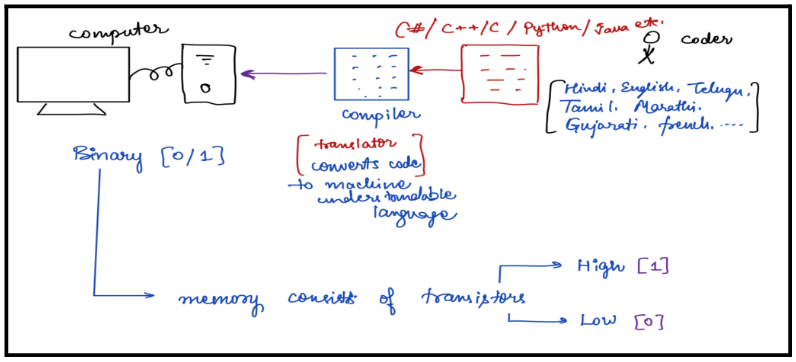
Scenario: The coder is trying to communicate with the computer.
- Examples of all languages they we know - Hindi, English, Telugu, Tamil, Marathi, Punjabi, Kannada, etc.
- Computer cannot understand these languages. It can only understand 0s and 1s.
- Since, we cannot learn to write instructions in binary language. We have learned programming languages like JAVA, C++, C#, Python, etc.
- Now, we need a translator to translate our instructions. So, computer can understand the instructions.
- Compiler helps us convert the code into machine understandable language.
Diagram to elaborate this:
IDE
Integrated Development Environment :
- IDE - tool for developers for software editing, building, testing, and packaging in an easy-to-use application,
- Since, we will not be doing these complicated things right now. We do not need any software installation required.
We will be using online ide throughout this module.
Scaler’s Online IDE: https://www.scaler.com/topics/java/online-java-compiler/
Importance of Syntax
I love to cook.
We can understand the meaning of this sentence.
I garden know don’t.
We cannot understand the meaning of this sentence.
The reason being the grammar is wrong.
Grammar :Rules of writing English.
Similarly, Rules of writing code : Syntax
Now, let us learn some rules and start writing our very first code.
Basic codes
public class Main {
    public static void main(String[] args) {
        System.out.print(100)
    }
}
The code which is already written, we can just ignore all those words. We will be learning about them in the upcoming sessions.
To get output in JAVA, we use:
System.out.print(100)
Output:
 [CompilationError] Your code was terminated due to compilation error
Main.java:4: error: ';' expected
System.out.print(100)
Rule 1 : Every statement should end with a semi-colon(;)
Correct the code and then run again.
System.out.print(100);
Output:
100
Rule 2 : JAVA is Case Sensitive.
We can try one more example.
system.out.print(5000);
Output
 [CompilationError] Your code was terminated due to compilation error
 Main.java:4: error: package system does not exist

 system.out.print(5000);
- We can observe that something is wrong with “system” and see the difference between the two statements.
- The only difference is that S is lowercase here.
Correct Method:
System.out.print(5000);
Output:
5000
Rule 3 : In order to print text we use double quotes (" ")
Printing text in Output
System.out.print(Priyanshi);
On running it, we will get an error.
Correct Way: System.out.print(“Priyanshi”);
Rule 4 : () , {}, “ ” → These All Should Be in Pairs
On removing one bracket from the code, it gives error.
class Main {
    public static void main(String args[]) {
      // Your code goes here
}
Output:
[CompilationError] Your code was terminated due to compilation error
Main.java:error: reached end of file while parsing
 }
Rule 5 : For Comments, Use // And /* … */
Comments -> Statements which we want our compiler to ignore. Comments are of two types :
- Single Line Comments : To write a single line comment just add two forward slashes (//) in front of the statement.
// System.out.print("HI");
// This is a single line comment.
2. Multi Line Comments : In order to comment out multiple lines together, we add /* at the beginning and then */ to close the comment.
 /*
System.out.print("Hello");
This is a multi line comment.
*/
Rule 6 : print() and println()
Let’s try to print something like this:
Hello Guys!!
Welcome to Robin Dhole blog!
 System.out.print(“Hello Guys!!”);
 System.out.print(“Welcome to Robin Dhole blog!”);
Output:
Hello Guys!!Welcome to Robin Dhole blog!
This is not giving us the correct output.
Introduce : System.out.println();
 System.out.println(“Hello Guys!!”);
 System.out.println(“Welcome to Robin Dhole blog!”);
Output:
Hello Guys!!
Welcome to Scaler!
Rule 6
print -> Just type the output
println -> Type the output and press Enter[cursor goes to next line]
Summary
- end statements with a semicolon ( ; )
- JAVA is case sensitive. -> System, system are considered different
- In order to print text, we use double quotes ( " " )
- {}, (), " " → All of these are in pairs.
- Comments →
- Single-line comments start with two forward slashes ( // ). Any text between // and the end of the line is ignored by Java (will not be executed).
- Multi-line comments start with /* and ends with /. Any text between / and */ will be ignored by Java.
- System.out.print(); → Just type the output
- System.out.println(); → Just type the output and press Enter [cursor moves to the next line]